






0
0
0
0
0
0
0
0

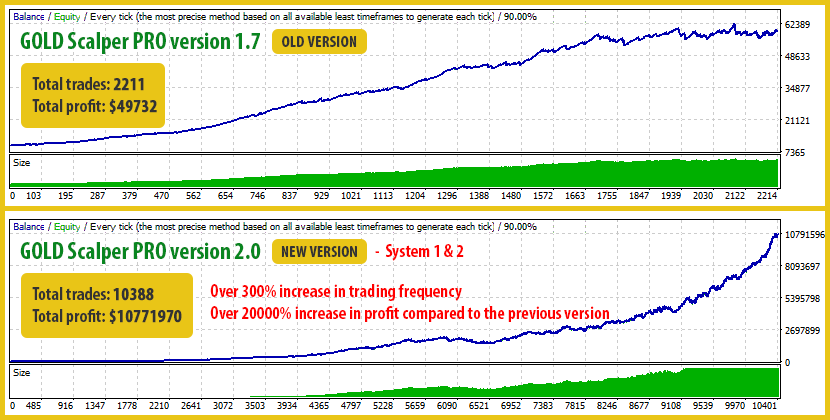
We are excited to announce the release of GOLD Scalper PRO version 2.0, a major upgrade focused on performance, stability, and smarter trading.
This update includes:
With both systems enabled, version 2.0 delivers:
All results are based on real backtests using default settings and are fully reproducible.
Read the full update details in our blog: Click here to read the full article
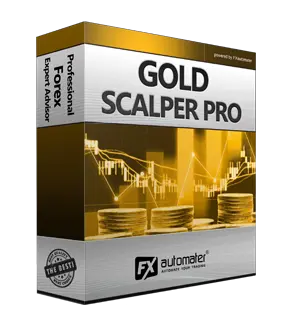
GOLD Scalper PRO is a cutting-edge, fully automated trading system designed to capitalize on the lucrative gold market (XAUUSD) with unparalleled precision and efficiency. Developed by a team of expert traders and programmers, this powerful trading EA (Expert Advisor) employs sophisticated algorithms and advanced strategies to identify high-probability trading opportunities and maximize your profits in the gold market.
We have used the most proven trading principle since the markets exist – namely a position entry in the direction of a distinctive market impulse and a following correction. This principle has been proven rock solid since the markets exist and it has been widely exploited by the "Smart Money" traders. We know this, because we have used this trading pattern more than 15 years in a different way in many trading systems and it just does not fail.
GOLD Scalper Pro is not just another curve fitted system with a hundred parameters. On the contrary - the trading logic is so strong and reliable, so it needs a few parameters to be profitable.
GOLD Scalper Pro is not a grid, martingale, or other risky strategy - it is a classical trading strategy by a textbook, which uses reasonable Stop Loss levels and an effective entry and exit trading logic.
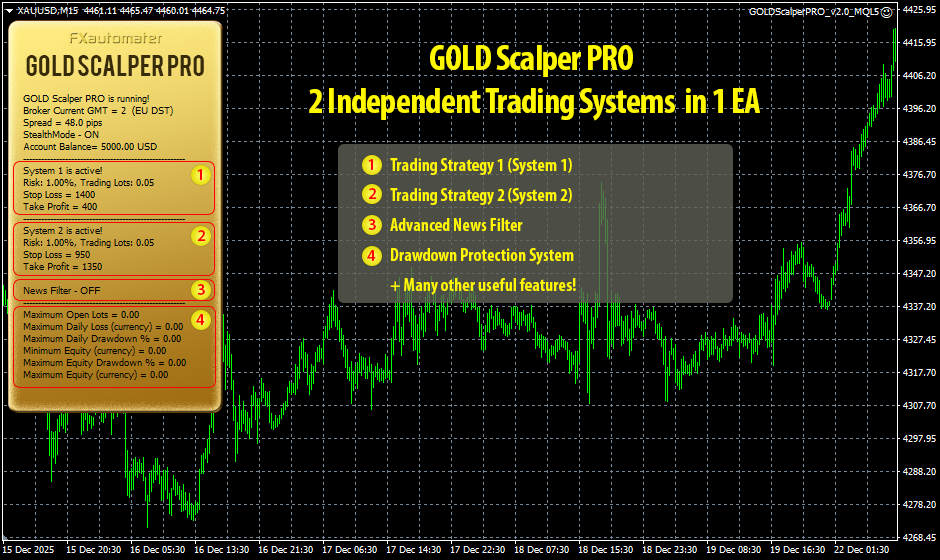
The EA includes an advanced core strategy called System 1, based on improved market entry logic and real-time trade management. This system is designed to analyze price action and identify high-quality intraday setups. The focus of System 1 is increased trading frequency with precise entries, strong filtering of false signals, and optimized profit capture. All trades are managed automatically with Stop Loss, Take Profit, and Trailing rules for consistent risk control.
The second strategy, System 2, operates using smart pending orders placed at strategic price levels according to predefined rules and current market conditions. System 2 allows participation in fast movements without chasing the market and provides full autonomous management with Stop Loss, Take Profit, and dynamic Trailing Stop. This strategy can be enabled or disabled directly from the EA settings to match the preferred trading style.
The Drawdown Protection Panel is an additional control layer in GOLD Scalper PRO that helps keep your account within predefined safety boundaries. It supports funded accounts and prop firms where equity limits are strictly enforced and monitors drawdown in real time to prevent approaching critical levels.
The system is easy to use and requires no advanced knowledge. You only define acceptable thresholds and the EA automatically manages trading activity, reduces excessive signal stacking, and provides visual reporting inside the terminal. The Protection Panel works independently from System 1 and System 2 and can be enabled or disabled at any time.
All configuration details can be found in the User Guide with clear, step-by-step instructions for safe and proper usage on LIVE, DEMO, and prop-firm environments.
GOLD Scalper PRO comes with Money Management System. You can set a risk in percents and the robot will automatically calculate the lots according the risk and your account free margin. The Money Management system includes Loss Recovery option called Recovery Mode.
Here is how the Recovery Mode works: When activated the system checks the account history to find previous losses. If there are not any losses in the past then the system wait for the first loss. When a loss occur GOLD Scalper PRO starts the recovery process. It increases the lot size of every new trade with small amounts until the last loss or previous losses are compensated completely. The process is very secure because the EA increase the lot size with small amounts.
GOLD Scalper PRO is equipped with Advanced News Filter. Thanks to this filter you can avoid trading during most important news and events. The news filter can increase the profit factor of the system and reduce the drawdown. It is disabled by default. If you want to use it you have to enable it and configure it precisely.
Configure MT4 terminal to allow WEB Requests to the following urls: http://www.fxautomater.com and https://www.fxautomater.com You can find it in: MT4 terminal -> Tools -> Options -> Expert Advisors -> Allow WebRequests for listed URL (check the image below):
The same way you can set up for MT5 terminals.
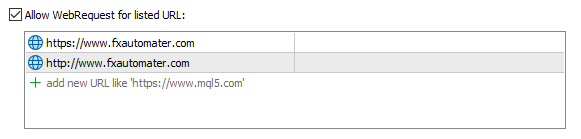
This is very important! This is the only way the News Filter to work properly. The information for the coming News and Events is on our website and you have to give a permission to the MT4/MT5 terminal to allow connections to our website.
With the Time Management System you can precisely configure the robot to trade only during specific hours. You can also configure the robot to trade or not on individual week days. This is a very powerful option which will let you avoid the most dangerous periods.
We all know that sometimes it could be risky to trade on Friday because the trades may remain during the weekend and may be closed on big loss due to Monday gaps. GOLD Scalper PRO has a Friday Exit system and you can configure the robot to close all trades on Friday Evening at a desired time and to stop trading after this time.
GOLD Scalper PRO will inform you about all actions performed in your account. It easy to set-up your terminal to receive these notifications. GOLD Scalper PRO can send email and push notifications to your mobile phone and inform you about its trades. By default these options are disabled. Please read below GOLD Scalper PRO Settings to learn how to enable Email and Push notifications.
You can run the EA on M1 or M15 chart – it makes no difference for the EA, as all used time-frames are hard-coded.
You can backtest and optimize the EA on M1 chart by “open price only” method – this will be correct enough and you will save a lot of time.
Finally, please, bear in mind that Holy Grail in trading does not exist! Even the best system suffers some bad periods. GOLD Scalper PRO is using very reasonable SL levels, so they can get hit /even repeatedly/ in bad market condition. Please, do not leave negative comments after every SL hit, or losing trade!
==== General Settings ====
==== System 1 Risk Management ====
Example 1: at AutoMM1 = 1, Forex GOLD Investor System 1 opens positions equal to 0.1 lots on $10000 account.
Example 2: at AutoMM1 = 0.5, Forex GOLD Investor System 1 opens positions equal to 0.05 lots on $10000 account.
==== System 2 Risk Management ====
Example 1: at AutoMM2 = 1, Forex GOLD Investor System 2 opens positions equal to 0.1 lots on $10000 account.
Example 2: at AutoMM2 = 0.5, Forex GOLD Investor System 2 opens positions equal to 0.05 lots on $10000 account.
==== System 1 Settings ====
==== Dynamic SL & TP ====
==== System 2 Settings ====
==== Notifications ====
==== GMT Settings ====
- If your broker has one GMT offset year-round (your broker never switches to summer/winter time) you must select DST_Usage=NONE.
- If your broker switch to summer/winter time based on EU DST (summer time from last Sunday of March till last Sunday of October) then set it DST_Usage=EU_DST.
- If your broker switch to summer/winter time based on US DST (summer time from second Sunday of March till first Sunday of November) then set it DST_Usage=US_DST.
==== News Filter Settings ====
The News Filter function is disabled by default. It is your personal choice whether, or not to activate this function. The News Filter function can increase the profit factor of the system and reduce the drawdown, but also can reduce the number of the trades and the total profit.
Configure MT4 terminal to allow WEB Requests to the following urls: http://www.fxautomater.com and https://www.fxautomater.com Only this way the news filter will be able to work properly!
You can find it in: MT4 terminal -> Tools -> Options -> Expert Advisors -> Allow WebRequests for listed URL (check the image below):
The same way you can set up for MT5 terminals.
==== Time Management Settings ====
These settings have been specially developed to help traders avoid certain hour periods during the trading week when the Forex market behaves more unpredictable.
Example: MondayHoursForbidden = "9,10,11,12,13,14,15,16";
==== Friday Exit ====
If you decide to use the "FridayExit" option you should set LastTradeHour and ExitHour several hours before the market closing of your broker on Friday.
==== Protection Settings ====
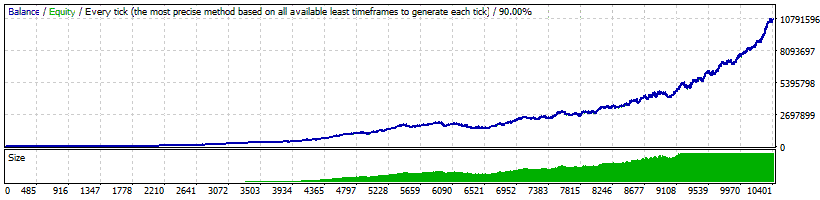
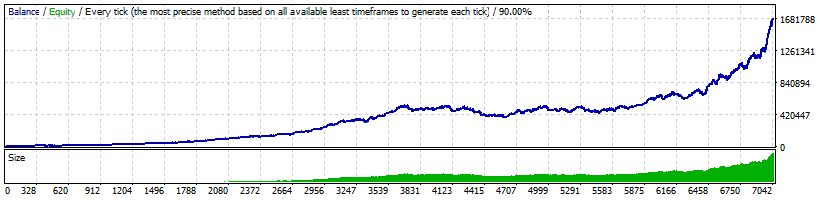
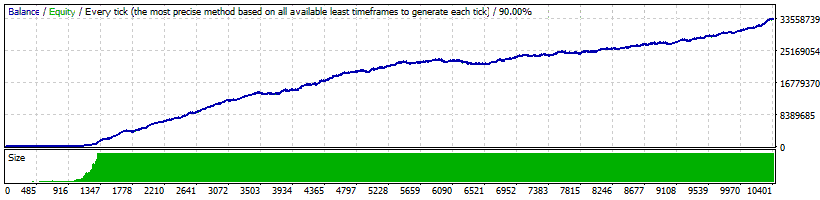
Below you can check the backtest result of our forex robot - GOLD Scalper Pro - with different risks and trading period.
XAUUSD
Period: 2004-2026
Risk: Auto MM
Deposit: $10000
Systems: 1 & 2
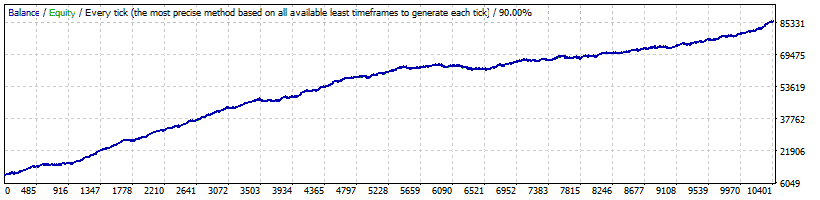
XAUUSD
Period: 2004-2026
Risk: Fixed Lots
Deposit: $10000
Systems: 1 & 2
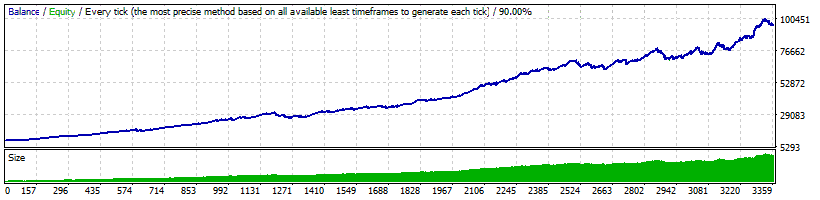
XAUUSD
Period: 2004-2026
Risk: Auto MM
Deposit: $10000
System: 1 only
XAUUSD
Period: 2004-2026
Risk: Auto MM
Deposit: $10000
System: 2 only
XAUUSD
Period: 2004-2026
Risk: Auto MM
Deposit: $10000
Systems: 1 & 2
You can download, install, and use GOLD Scalper PRO during your next trading session. You can do this in less than 5 minutes.
Download GOLD Scalper PRO with a few clicks.
The installation process takes no longer than 2 minutes.
Start trading immediately in your next trading session.
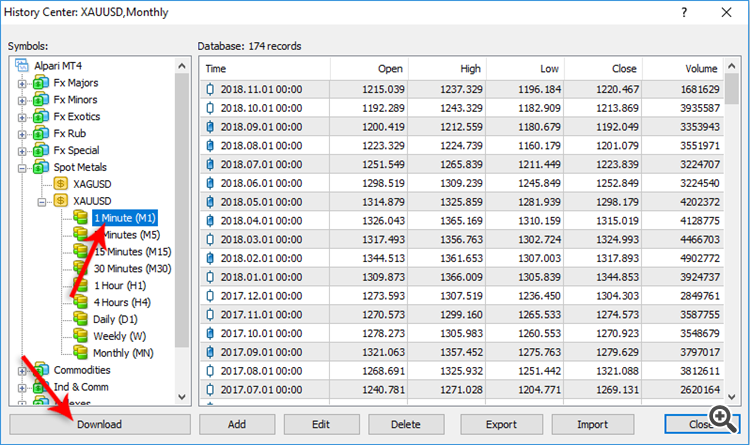
If you wish to back-test GOLD Scalper PRO, first you should download history from the MetaTrader history center: click Tools -> History Center, or press the "F2" key of the keyboard. In the list, find the XAUUSD (GOLD) currency pair and double click to expand it. Click "1 Minute (M1)" and then click "Download". When the download process is finished, double click on "5 Minutes (M5)” and "15 Minutes (M15)" to convert the M1 data (repeat this for the rest of the time frames). Close the "History Center" window. Restart the MT4 terminal in any case. Check the below image!
To open the "Strategy Tester" window click the "Strategy Tester" button of the MetaTrader menu, or press "Ctrl+R" on the keyboard. In the "Strategy Tester" window chose GOLD Scalper PRO, chose XAUUSD currency pair, chose M15 timeframe, chose the method "Every tick ...", as shown below. Click "Start" to start the back-test.
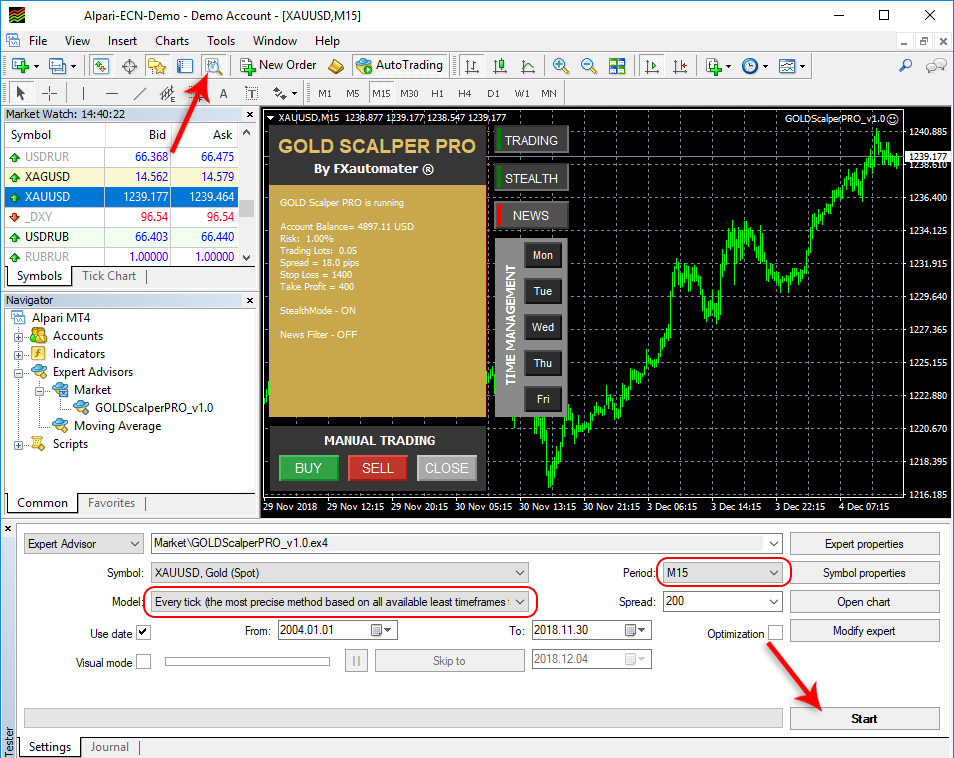
The back-test by "Every tick" is the most precise, but it is very slow. If you wish to save time you can run the back-test on M1 timeframe by "Open price only ..." method and this will be correct too.

GOLD Scalper PRO is compatible with the most well known and used Operating Systems Mac OS + Windows OS. Our developers have been working very hard to adapt GOLD Scalper PRO to be compatible with all popular Operating Systems. Mac OS and Windows are the most popular OS around the world and therefore we have developed GOLD Scalper PRO to be compatible with them.

GOLD Scalper PRO is compatible with the most used metatrader platforms in the forex market - Metatrader 4 (MT4) and Metatrader 5 (MT5).
2 Systems in One EA: GOLD Scalper PRO combines two powerful trading strategies in a single Expert Advisor. System 1 improves market entries and trade management for higher-accuracy signals, while System 2 uses smart pending orders to capture opportunities based on market conditions. Both systems are low-risk, fully automated, and use reasonable Stop Loss and Take Profit levels with textbook trading logic, avoiding grid or martingale methods.
Drawdown Protection Panel: GOLD Scalper PRO includes a dedicated Drawdown Protection Panel to safeguard your account. This system monitors equity in real time and helps prevent the account from exceeding defined drawdown limits, making it ideal for funded and prop-firm accounts. The Protection Panel works automatically, requires no advanced knowledge, and complements both System 1 and System 2 to ensure safe and controlled trading.
Fully automated: One of the main reasons to purchase and use GOLD Scalper PRO is that it is fully automated and easy to use expert advisor (forex robot), which will help you during the live trading and growing your account balance.
Low-risk strategy: GOLD Scalper PRO is a low-risk strategy. GOLD Scalper Pro is not a grid, martingale, or other risky strategy - it is a classical trading strategy by a textbook, which uses reasonable Stop Loss levels and an effective entry and exit trading logic.
Free updates: All future updates of GOLD Scalper PRO will be completely free for you and you will get professional support from our team.
Everything you need:GOLD Scalper PRO is very powerful trading system which includes the most important features and system you need for risk free trading: Money Management, Broker Protection, Spread Protection, Highly effective Trading & Exit Logic, Dynamic Stop Loss, Advanced Time Management, News Filter, Email and Push Notification System, Friday Exit System and etc.
Profit Potential: The gold market is known for its high profit potential due to significant price fluctuations. GOLD Scalper PRO's scalping strategy maximizes opportunities to profit from these movements.
Time-Efficient: Trading gold manually can be time-consuming and demanding. GOLD Scalper PRO frees you from constant monitoring, allowing you to pursue other activities while it handles the trading for you.
Accessibility: GOLD Scalper PRO brings professional-grade trading capabilities to traders of all experience levels. Even if you're new to trading, you can benefit from the EA's sophisticated approach.
Emotion-Free Trading: Emotions can lead to impulsive decisions, often resulting in losses. GOLD Scalper PRO executes trades based on predefined parameters, removing emotions from the equation.
By purchasing and using our GOLD Scalper PRO, you will not only get a really working forex robot but also some first class of services such as professional support, money back guarantee, free updates and last, but not least, a transparent and clear price policy.
GOLD Scalper PRO comes with a quick-install wizard that will walk you through the simple install and configuration process. No additional skills, tools, or downloads are required.
It is very easy to use GOLD Scalper PRO. We provide user manual with detailed instructions how to download, install and configure. We provide .set files and all you need.
GOLD Scalper PRO analyzes the market, places orders at the right time and manages them for you. And this happens completely automatically.
GOLD Scalper Pro is not a grid, martingale, or other risky strategy - it is a classical trading strategy by a textbook, which uses reasonable Stop Loss levels and an effective entry and exit trading logic.
Explains how to install and set up GOLD Scalper PRO with fulll instructions for downloading, installing, and running the EA plus tips on how to use, optimize and configure it.
It is one-time payment and all future updates of GOLD Scalper PRO are completely free for you. You get life-time free updates and support.
You can contact us whenever you want, regardless of the type of question or problem you wish to report. We will get back to you as soon as possible.
You have 30 days to try our forex robot. Go for it! If it does not make profit for you, we will return your money.
Safe-Haven Asset: Gold has historically been considered a safe-haven asset, sought by investors during times of economic uncertainty or geopolitical instability.
Diversification: Trading gold offers diversification benefits to your investment portfolio, as it can perform differently from traditional financial assets like stocks and bonds.
Long-Term Trend: Gold has maintained its value over the long term, making it an attractive option for investors looking for a store of value.
High Liquidity: The gold market is highly liquid, ensuring that you can easily enter and exit positions without significant price slippage.
Volatility: Gold exhibits significant price volatility, creating ample opportunities for traders to profit from price fluctuations.

If you want to trade with GOLD Scalper Pro you have to purchase it by clicking the button below. It will redirect you to the payment page and you will be able to make a payment and start using it on your DEMO or REAL account immediately.
Price: $447 $177
Disclaimer U.S. Government Required Disclaimer – Trading foreign exchange on margin carries a high level of risk, and may not be suitable for all investors. The high degree of leverage can work against you as well as for you. Before deciding to invest in foreign exchange you should carefully consider your investment objectives, level of experience, and risk appetite. The possibility exists that you could sustain a loss of some or all of your initial investment and therefore you should not invest money that you cannot afford to lose. You should be aware of all the risks associated with foreign exchange trading, and seek advice from an independent financial advisor if you have any doubts. Clearly understand this: Information contained within this course is not an invitation to trade any specific investments. Trading requires risking money in pursuit of future gain. That is your decision. Do not risk any money you cannot afford to lose. This document does not take into account your own individual financial and personal circumstances. It is intended for educational purposes only and NOT as individual investment advice. Do not act on this without advice from your investment professional, who will verify what is suitable for your particular needs & circumstances. Failure to seek detailed professional personally tailored advice prior to acting could lead to you acting contrary to your own best interests & could lead to losses of capital.
*CFTC RULE 4.41 – HYPOTHETICAL OR SIMULATED PERFORMANCE RESULTS HAVE CERTAIN LIMITATIONS. UNLIKE AN ACTUAL PERFORMANCE RECORD, SIMULATED RESULTS DO NOT REPRESENT ACTUAL TRADING. ALSO, SINCE THE TRADES HAVE NOT BEEN EXECUTED, THE RESULTS MAY HAVE UNDER-OR-OVER COMPENSATED FOR THE IMPACT, IF ANY, OF CERTAIN MARKET FACTORS, SUCH AS LACK OF LIQUIDITY. SIMULATED TRADING PROGRAMS IN GENERAL ARE ALSO SUBJECT TO THE FACT THAT THEY ARE DESIGNED WITH THE BENEFIT OF HINDSIGHT. NO REPRESENTATION IS BEING MADE THAT ANY ACCOUNT WILL OR IS LIKELY TO ACHIEVE PROFIT OR LOSSES SIMILAR TO THOSE SHOWN.
By using FXAutomater's products, you acknowledge that you are familiar with these risks and that you are solely responsible for the outcomes of your decisions. We accept no liability whatsoever for any direct or consequential loss arising from the use of this product. It's to be noted carefully in this respect, that past results are not necessarily indicative of future performance.